

Have you ever wished a tool could help you write faster answer questions and save time without making the work feel cold? That is the promise of ai assist. Today many tools use AI to learn from input reason over text and data and give useful suggestions. Google Cloud describes AI as technology that can learn reason and perform advanced tasks like understanding language and analyzing data. IBM also explains that AI can simulate learning comprehension problem solving and decision making.
In this guide you will learn what ai assist means how it works where it helps the most and how to use it in a smart way. We will keep it simple so you can use the ideas right away.
What AI Assist Means
AI assist is a simple name for tools that help people do work faster. It can draft text suggest ideas sort information summarize notes or guide a next step. It does not replace human thinking. It supports it. Google Cloud and IBM both describe AI as a system that can understand language analyze data and help with advanced tasks that once needed human effort.
The best way to think about ai assist is this. It is like a smart helper that works beside you. You still choose the goal. You still check the result. But the tool can make the first step easier and much faster. This is why ai assist has become useful in many fields. It can help a student a writer a business owner or a support team member.
How AI Assist Works
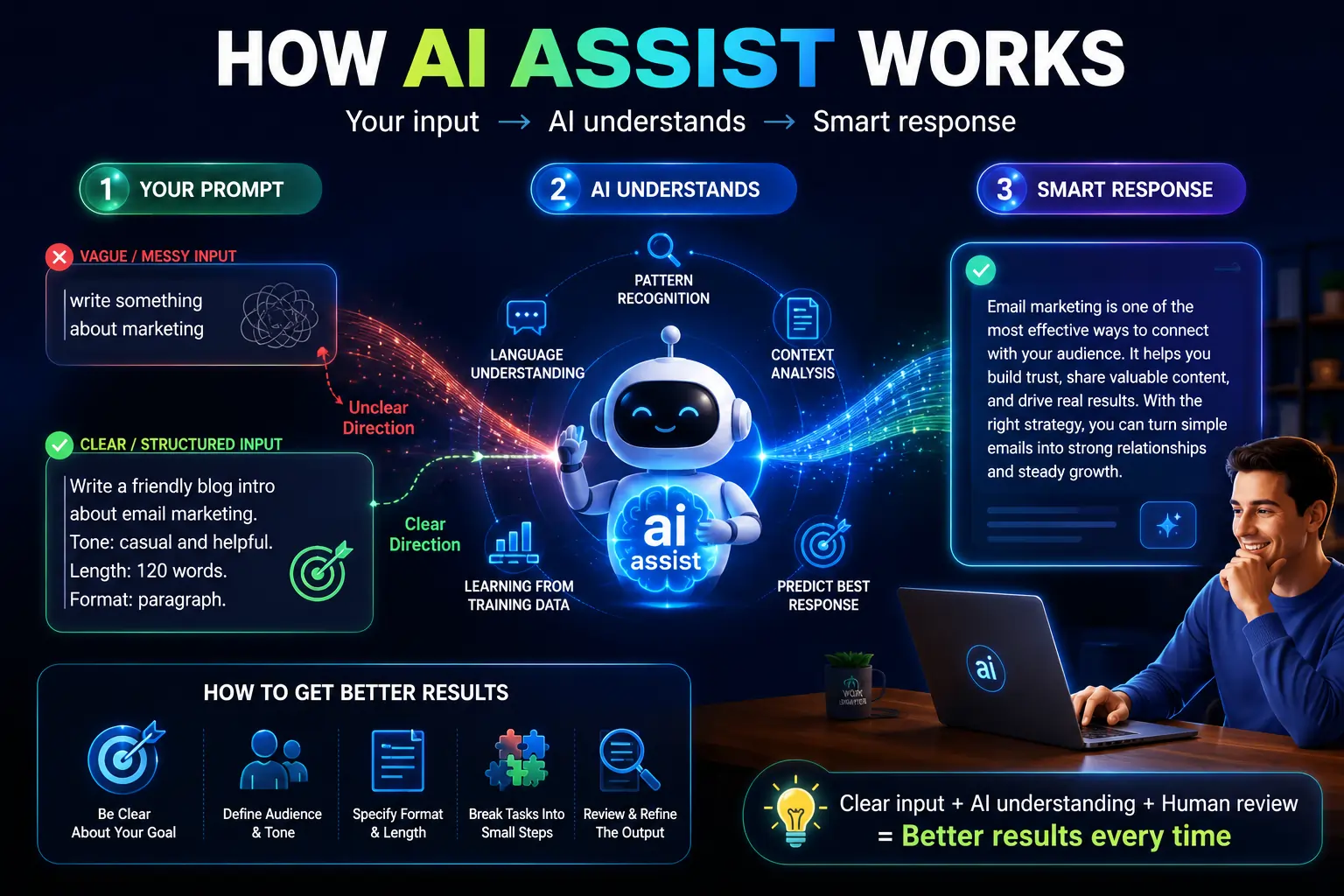
AI assist works by taking your prompt and looking for patterns in language and data. It uses training to predict what response fits best. It can also use context from your words to shape the answer. OpenAI explains that instruction following and conversational replies are central to systems like ChatGPT. Google Cloud also notes that AI can understand language and provide helpful suggestions.
This is why clear input matters so much. When you give ai assist a short messy prompt it may guess the wrong need. When you give it a clear goal a clear tone and a clear format it usually gives a better answer. Think of it like giving directions to a helper. The clearer your directions are the better the result will be.
OpenAI has also highlighted research style use cases where AI can follow instructions and present analysis in structured formats.
Why People Use AI Assist
People use ai assist because it saves time. It can turn a blank page into a rough draft. It can turn long notes into a short summary. It can turn a broad idea into a cleaner plan. Deloitte says AI use cases now cover many industries and functions because the technology can improve efficiency scale and capacity across many kinds of work.
People also use ai assist because it lowers stress. Starting is often the hardest part. A tool that gives a first draft can make the job feel less heavy. It can help when you feel stuck or when you need a quick answer to a common question. This is one reason ai assist is now seen as a practical helper and not just a trendy tool.
Where AI Assist Helps Most
AI assist is strongest when the task is routine and text based. It can help write emails create outlines draft blog ideas rewrite sentences and summarize large documents. It can also help with customer support replies content planning and simple data explanation. Google Cloud and IBM both describe AI as useful for language data and decision support tasks.
AI assist is also useful in business work. Teams use it to brainstorm ideas sort information and speed up common office tasks. Google Cloud and Deloitte both show that AI is being used across many functions because it can improve efficiency and support more work in less time.
It can even help in coding and technical work. Google Cloud says AI code generation can create code from a user prompt and assist with completion. That does not mean it writes perfect code every time. It means it can speed up the first step and help developers move faster.
What AI Assist Cannot Do Well
AI assist is helpful but it is not perfect. It can make mistakes. It can miss context. It can sound confident even when the answer is weak. IBM recommends human oversight to review and validate AI output. Google Cloud also describes human in the loop design as a way to improve accuracy and reliability.
This means you should never copy everything without checking. Use ai assist as a starting point. Do not treat it as the final judge for important work. This is especially true for health legal money or sensitive business topics. Careful review keeps the work safe and useful. IBM also notes that responsible AI needs guardrails and oversight.
Privacy matters too. People should be careful about sharing secret data or private client details inside tools they do not fully trust. Google Cloud warns that shadow AI can raise risks around security compliance and privacy. That is why it is smart to use approved tools and follow company rules.
How To Get Better Results From AI Assist
The easiest way to improve ai assist is to give it a clear task. Say what you want. Say who it is for. Say the tone. Say the length. Say the format. The more specific you are the better the output usually becomes. OpenAI notes that instruction following is a core strength of conversational AI systems.
You should also break big tasks into small parts. Do not ask for everything at once if the job is complex. Ask for an outline first. Then ask for a draft. Then ask for a rewrite. This keeps the work clean and easier to control.
Always review the final result. Check facts. Check spelling. Check tone. Check if the answer truly fits the need. AI assist can speed up the job but your judgment gives it quality.
AI Assist in Daily Life
AI assist is not only for offices and tech teams. It can help in daily life too. A student can use it to turn class notes into simple study points. A job seeker can use it to improve a resume summary. A small business owner can use it to draft product text or reply to common customer messages. A busy parent can use it to plan a meal list or organize a week. These simple tasks save time and mental energy.
The big value of ai assist is not that it does everything for you. The big value is that it helps you move from idea to action faster. That makes daily work feel lighter and more organized.
How To Choose the Right AI Assist Tool
Choose a tool that fits your task. A writing tool should help with text. A support tool should help with replies. A coding tool should help with code. A research tool should help with summaries and analysis. Google Cloud and IBM both show that different AI systems are built for different jobs.
Look for simple controls clear output and good privacy settings. Choose a tool that lets you review and edit the result. That way ai assist stays useful and does not become a risk.
Conclusion
AI assist is a smart helper for modern work. It can save time reduce stress and make hard tasks easier to start. It works best when your prompt is clear and your review is careful. It also works best when you treat it as support and not as a full replacement for human judgment. That is the real power of ai assist. Use it to move faster. Use it to stay organized. Then add your own thinking to finish the job well.
FAQ’s
Q1. What does AI assist mean?
AI assist means a tool that helps you do a task faster or more easily. It can write summarize suggest and organize. It is a helper not a full replacement for your own thinking.
Q2. Is AI assist the same as a chatbot?
Not always. A chatbot is one type of tool. AI assist is a wider idea. It can appear inside chat tools writing tools support tools and coding tools.
Q3. Can AI assist replace human work?
No. It can help with parts of the work but it still needs human review and judgment. IBM and Google Cloud both stress oversight and human in the loop design for better accuracy.
Q4. Is AI assist safe to use?
It can be safe when you use trusted tools and avoid sharing private data in the wrong place. Security privacy and compliance still matter. Google Cloud warns that risky or unapproved AI use can create problems for organizations.
Q5. How can I get better results from AI assist?
Give clear instructions. Break the task into steps. Ask for the format you want. Then review the result before using it. Clear prompts and human review usually lead to better output.
